
- Article published at:
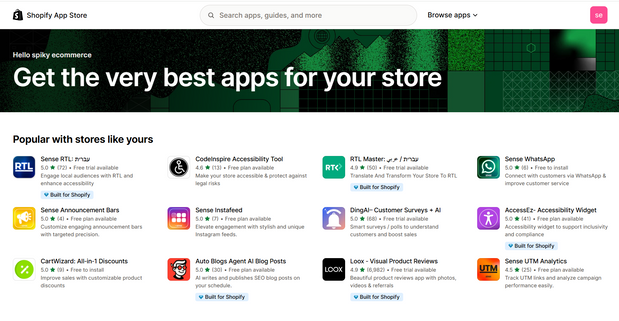
חנות האפליקציות של Shopify
Shopify מכסה את הבסיס של כל חנות, ולכל דבר מעבר- יש אקוסיסטם אפליקציות ענק שמאפשר להתאים, להאיץ צמיחה, ולשמור על גמישות בלי לפגוע בביצועים.
זמן קריאה: ~6 דקות
TL;DR: מעל 8,000 אפליקציות, תהליך בדיקה קפדני, אלגוריתם המלצות שמבוסס על חנויות דומות, ואפשרות התאמה כמעט לכל צורך. המטרה היא לבנות סט אפליקציות רזה שמביא ערך מדיד, בלי כפילויות ובלי האטות.
למה בכלל מיועדות האפליקציות?
מהירות ליישום: פיצ'רים מתקדמים בלי פיתוח מאפס.
גמישות: מחליפים, בודקים, ומבצעים A/B לפני החלטה ארוכת טווח.
סקייל: רוב האפליקציות נבנו לענות על עומסים של חנויות גדולות.
עלות יעילה: משלים פונקציונליות לפי צורך, משלמים רק על מה שמשתמשים בו.
איך לבחור נכון? צ'ק ליסט קצר
מטרה ברורה: מהו המדד שנרצה לשפר, המרות, AOV, זמן תפעול.
השפעה על ביצועים: כמה סקריפטים נטענים, האם יש תמיכה ב-App Blocks ו-Checkout Extensibility.
תאימות: תבנית, שפה, מטבע, מול אפליקציות קיימות.
תמחור: מודל חודשי, עמלות לפי שימוש, תקופת ניסיון.
תמיכה ותיעוד: מדריכים, צ'אט, קצב עדכונים, דירוגים וביקורות.
אבטחה ופרטיות: אילו הרשאות נדרשות, גיבוי ויצוא נתונים.
מה מיוחד ב-Shopify App Store?
מגוון עצום: יותר מ-8,000 אפליקציות לכל צורך, עיצוב, שיווק, תפעול, צ'קאאוט, שילוח.
בדיקה קפדנית: כל אפליקציה עוברת ביקורת עם מעל מאה נקודות בדיקה לפני פרסום.
המלצות חכמות: הצעות מבוססות ביצועים של חנויות דומות, פחות ניחושים ויותר דיוק.
קטגוריות עיקריות בקצרה
קטגוריות: ערוצי מכירה, מציאת מוצרים, מכירת מוצרים, הזמנות ושילוח, עיצוב החנות, שיווק והמרה, ניהול החנותטופ קטגוריות: דרופשיפינג, מרקטפלייסים, ביקורות מוצרים, אפסל ובאנדלים, אימייל מרקטינג, SEO, שילוח, מטבע ותירגום.
אפליקציות מומלצות לפי שלב וצורך
סט התחלה לחנות חדשה
ביקורות מוצרים: איסוף ועדכון אוטומטי של ביקורות עם תמונות.
אימייל מרקטינג: פופאפים, סדרות נטישת עגלה, דיוור קבוע.
אפסלים ובאנדלים: הצעות השלמה בעמוד מוצר וצ'קאאוט.
SEO בסיסי: מטא, שיפור כתובות, סכמות.
תירגום ומטבע: לוקליזציה למדינות יעד.
סט צמיחה לחנות פעילה
נאמנות והפניות: נקודות, הטבות, תוכנית שותפים.
חיפוש מתקדם ופילטרים: שיפור איתור מוצרים, סמארט סורט.
שילוח ותמחור חכם: תעריפים דינמיים, חבילות, איסוף מהחנות.
אנליטיקה והטמעת פיקסלים: ניהול פיקסלים מרוכז, אירועי המרה.
סט B2B
תמחור לפי לקוח, רשימות מחיר: חשבונות סיטונאות, מינימום הזמנה.
הצעות מחיר והזמנה מהירה: טבלאות הזמנה, קבצי CSV.
תנאי תשלום ושילוח מותאם: נטו פלוס, אשראי, משלוח מרובה כתובות.
תהליך עבודה מומלץ ליישום
מיפוי צרכים: רשימת מטרות ומדדים, בלי לרוץ להתקין.
סינון ראשוני: 2-3 אפליקציות מועמדות לכל צורך, בדיקה מול התבנית והסט הקיים.
פיילוט מדיד: -התקנה בסביבת טסט או חלון זמן רגוע, הפעלת לוגים ומדדי המרה.
הקשחת אבטחה: צמצום הרשאות, בדיקת יצוא נתונים וגיבוי.
הקשחת ביצועים: בדיקת Lighthouse לפני ואחרי, ניטור זמן טעינה.
איחוד סט האפליקציות: הסרת כפילויות, בדיקת קונפליקטים, תיעוד מלא.
טעויות נפוצות שכדאי להימנע מהן
התקנת עודף: יותר מדי אפליקציות בלי מדידה, האטה וקונפליקטים.
חוסר תאימות: ערבוב בין אפליקציות שמזריקות קוד ישן לסקשנים מודרניים.
חוסר תיעוד: אין Owner לכל אפליקציה, אין תיאור מה היא עושה.
התעלמות מפרטיות: הרשאות רחבות, אין מדיניות מחיקה או יצוא.
שאלות נפוצות
איך יודעים אם אפליקציה תואמת לתבנית שלי
חפשו תמיכה ב-App Blocks ו-Online Store 2.0, בדקו אם יש מדריך התקנה לתבניות נפוצות, ובחנו דמו לייב. אם יש לכם סביבת טסט, עדיף לבדוק שם קודם.
אפשר לעבור בין אפליקציות בלי לאבד נתונים
בדקו יכולות יצוא, למשל ביקורות ב-CSV, לידים, רשימות מנויים. אם אין יצוא, שקלו כלי גישור או יבוא דרך API.
איך מוודאים שהביצועים לא נפגעים
בדקו ZRT, בקשות רשת, גודל חבילות, וכמות סקריפטים. העדיפו אפליקציות עם App Blocks והטמעות צד שרת איפה שאפשר.
משאבים להעמקה
Shopify Help Center: מדריכים רשמיים להתקנה ותפעול.
API documentation: למפתחים שרוצים התאמות ייעודיות.
Shopify Community: תשובות מהשטח, טיפים, אירועי קהילה.
Shopify Blog, Research: טרנדים, סיפורי לקוחות, בדיקות A/B.
קרא מאמר
