מהלך חדש ומסקרן של Shopify יוצא לדרך עם שחרורו של כלי בדיקות השוואתיות חדש בגישה מוקדמת- "Rollout". מדובר בבשורה משמעותית עבור בעלי חנויות, שכן מעתה ניתן לבחון שינויים עיצוביים ותפקודיים באתר ישירות מתוך ממשק הניהול של הפלטפורמה, ללא צורך בהתקנת תוספים חיצוניים.
החשיבות של הכלי החדש טמונה בכך שהבדיקות מתבצעות בטכנולוגיית "צד שרת". המשמעות היא שהמערכת של שופיפיי מנהלת את הנתונים ומציגה את הגרסאות השונות לגולשים בצורה חלקה ומדויקת יותר מאי פעם, מה שמונע עיכובים בטעינת האתר ומבטיח שהנתונים שייאספו יהיו אמינים לחלוטין. למרות שבעבר הכלים הפנימיים של הפלטפורמה לא תמיד היו המובילים בתחומם, הפעם נראה כי מדובר בשינוי מהותי שמציב את היכולת לשפר את ביצועי האתר במרכז העשייה.
תהליך העבודה עם הכלי פשוט וידידותי: ניתן לבחור פרק זמן מוגדר לבדיקה ולקבוע איזה אחוז מקהל הגולשים ייחשף לשינוי. לאחר מכן, מבצעים את השינויים הרצויים בעורך העיצוב הייעודי, והמערכת מציגה אותם באופן אוטומטי לקבוצת המשתמשים שנבחרה. עבור מי שעוסק בפיתוח האתר, מומלץ לשכפל רכיבים ספציפיים ולבצע בהם את השינויים בנפרד, כדי שניתן יהיה לשלב את הגרסה המוצלחת ביותר בקלות לאחר סיום הבדיקה. זהו צעד חשוב שהופך את תהליך שיפור החנות וקבלת החלטות מבוססות נתונים לנגיש ופשוט עבור כולם.
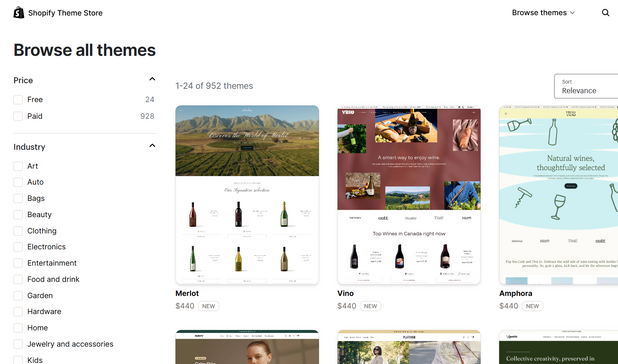
הנראות של החנות שלכם, מהירות האתר וההמרות מושפעות ישירות מהתבנית. 2025 מביאה פיצ'רים חכמים ומסגרת תבניות מעודכנת, ולכן בחירת תבנית כבר לא עניין של עיצוב בלבד.
זמן קריאה: ~5 דקות
TL;DR: מחפשים תבניות שמביאות גם מהירות וגם גמישות? הנה התבניות הבולטות לצמיחה מהירה, Hyper לביצועים וקטלוגים גדולים, Sleek לדפי מוצר ממירים וניקיון עיצובי. לצידן יש עוד 5 תבניות חינמיות שכדאי לבדוק.
מה חדש בעולם התבניות ב-2025
מבני עמוד גמישים: מערכת סקשנים מודולרית שמאפשרת לשנות פריסות בלי להעמיס אפליקציות.
חיפוש וסינון חכמים: איתור מוצרים מהיר יותר, סינון צפוי ונוח.
פרסונליזציה מובנית: בלוקים חכמים להמלצות ומסרים דינמיים.
מובייל תחילה: דגש על מהירות, נגישות ותמיכה גלובלית.
בחירות מהירות לפי מודל עסקי
DTC או B2C: Sleek, Zest, Be Yours, Prestige, Stiletto, Impulse, Blum, Mavon, Broadcast, Concept
B2B או סיטונאות: Hyper, Normcore, Enterprise, Zest, Mavon
היברידי DTC+B2B: Hyper, Normcore, Zest
מוצר יחיד או קטלוג קטן: Be Yours, Sleek, Blum, Broadcast, Prestige
קטלוג גדול: Hyper, Symmetry, Enterprise, Normcore, Impulse
15 תבניות פרימיום מומלצות ל-2025
1) Hyper, כ-$400
תבנית ל-DTC ו-B2B שמטפלת בביצועים, פריסות מורכבות ומחירי כמות, תוך שמירה על טעינה מהירה.
כלי סיטונאות, רשימות הזמנה מהירה, מחירי מדרגות, מגבלות כמות.
חיפוש חכם, סינון צפוי, בלוקים חכמים, לוגיקת קידום.
סקשנים מודולריים וגמישים, פריסטים ייעודיים, כלים להמרה כמו דביק קארט וטיימרים.
2) Sleek, כ-$350
עיצוב נקי ומודרני עם דפי מוצר ממוקדי המרה, חוויית מובייל זורמת ו-UX מודרני.
אנימציות עדינות שמכוונות קשב, וידאו ושכבות טקסט.
אפסלים ובאנדלים מובנים שמעלים AOV בלי לשבור זרימה.
קארט צד, Quick buy, אפשרויות מתנה וניהול תפריט פרומואים.
3) Zest, כ-$330
מובייל תחילה, אינטראקציות אגודל חלקות, נווט מהיר ותצוגות וריאנטים חכמות.
כלי המרה כולל טיימרים, דביק קארט, מתנות עטיפה.
ניווט קולקציות עם תמונות, Quick buy מדפי אוסף.
4) Prestige, $400
מותגי יוקרה שמחפשים טיפוגרפיה אלגנטית ותצוגת תמונה קולנועית.
הוטספוטים, לוקבוק, זום ווידאו, ניווט עשיר.
מוגבלת בגמישות מבנית עמוקה, דורשת לפעמים מפתח.
5) Impulse, $400
מסחר חזותי חזק עם כלי קידום עונתיים, מתאים לקטלוגים בינוניים וגדולים.
באנרים, טיימרים, סאבים של קולקציות, פרומואים בתפריט.
שימו לב לתמונות פוסטר במובייל, דורש התאמות נכונות.
6) Taiga, כ-$490
ביצועים מהירים מאוד, סיפור ויזואלי לקהל Outdoor ולייף סטייל.
מעל 10 סקשני וידאו, קארט צד, חיפוש חכם, אינפיניט סקרול.
לפריסות ייחודיות מאוד ייתכן שתצטרכו מפתח.
7) Concept, כ-$380
אסתטיקה חדה ומודרנית, 48 סקשנים מודולריים, מגה-תפריט טאבים עם ויזואלס.
Shop-the-feed עם וידאו, קארט צד ממותג.
ביצועי מובייל נמוכים יחסית, פחות מותאם ליכולות החדשות.
8) Symmetry, כ-$380
עיצוב מערכתי ונקי לחנויות גדולות, דוקומנטציה טובה ומבנה ידידותי למפתחים.
מגה-תפריט מתקדם, חיפוש צפוי, אינפיניט סקרול.
יש דיווחים על חוסרים נקודתיים בהתאמות באזורי פוטר.
9) Broadcast, $400
מותגי לייף סטייל שמובילים עם תוכן וזהות חזותית.
פרומואים בתוך תפריט, קארט דביק, בלוקים טקסט+מוצר.
שימו לב לביקורות על SEO ותמיכת תמיכה איטית במקרים מסוימים.
10) Enterprise, כ-$380
מותאם לקטלוגים גדולים ותנועה גבוהה, עם גיליונות מוצר עשירים וכלי קידום בזמן אמת.
מגה-תפריט רב עמודות, חיפוש חכם, קוויק-וויו.
תמיכה יכולה להתעכב בפרויקטים מורכבים.
11) Be Yours, כ-$320
קל ומהיר, בהשראת Dawn, עם עוד יכולות מסחר מובנות.
Quick buy, קארט צד, טיימרים, פרומואים בתפריט.
מבנה פשוט, פחות גמישות מתקדמת.
12) Normcore, כ-$320
פוקוס על ניווט מהיר וניהול קטלוגים גדולים, מתאים גם ל-B2B.
רשימות הזמנה, מחירי מדרגות, ניווט שכבות עמוק.
מובייל טוב אך לא המהיר ביותר.
13) Stiletto, כ-$380
סטוריטלינג עריכתי נועז, מתאים לפאשן ותכשיטים.
קארט דביק, פרה-אורדר, לוקבוק, הוטספוטים.
דיווחים על עיכובי תמיכה ובעיות בדפדפני אינ-אפ.
14) Mavon, כ-$280
מהיר ומודרני עם הרבה כלים בלי להעמיס אפליקציות.
חיפוש צפוי, מגה-תפריט, רולאובר, מודלי 3D, וידאו.
15) Blum, כ-$170
תבנית נקייה ומהירה, מצטיינת במובייל, סט פריסטים רחב.
גלריות, הוטספוטים, לוקבוק, ניווט אינטואיטיבי.
תמיכה עלולה להיות איטית במקרים מסוימים.
5 תבניות חינמיות שכדאי להכיר
1) Horizon
עריכת בלוקים גמישה מאוד, פריסטים רבים וכלי יצירה חכמים. במובייל עשוי לדרוש אופטימיזציה נוספת.
2) Refresh
נקי ומהיר, מתאים לקטלוגים קטנים עד בינוניים, SEO ידידותי.
3) Spotlight
ויז'ואל-פרסט פשוט ומהיר, מצוין לזינוק ראשוני, פחות עשיר בכלי קידום.
4) Craft
סטוריטלינג לאומנים ויוצרים, ביצועים טובים, קוד נקי.
5) Taste
מותאם למזון ומשקאות, כרטיסי מוצר גדולים, חוויית קארט נעימה.
איך לבחור תבנית שממירה ב-2025
מודל עסקי וקטלוג: DTC צריך סטוריטלינג וגמישות, B2B צריך הזמנה מהירה ומחירי מדרגות.
יכולות 2025: פריסות גמישות, חיפוש חכם, בלוקים פרסונליים, כלי המרה מובנים.
מובייל תחילה: כפתורים גדולים, Quick buy מדפי אוסף, תפריטים ברורים.
תנסו דמו ותבדקו ביקורות: אל תסתמכו על צילומי מסך בלבד.
שאלות נפוצות
איפה הכי כדאי לקנות תבנית?
חנות התבניות הרשמית של Shopify, שם כל תבנית עוברת בדיקות מהירות, אבטחה ושימושיות. פחות מומלץ לרכוש תבנית חיצונית מבוססת קוד
שווה לשלם על תבנית פרימיום?
ברוב המקרים כן. חוסך אפליקציות, זמן פיתוח ומביא חוויית משתמש מלוטשת.
מה לחפש בבדיקת מובייל?
ניווט אגודל,Side cart, Quick buy, גלריות שלא נחתכות, וסינון שמרגיש טבעי.
תבנית מומלצת לדרופשיפינג
Impulse ו-Mavon חזקות בקידום ובהמרה, יש גם תבניות ייעודיות שמגיעות עם סושיאל פרופ ודחיפות.
סיכום
ב-2025 התבנית צריכה להיות מהירה, גמישה ומוכנה לכלים חכמים. Hyper ו-Sleek מצוינות לנקודת פתיחה, ולצדן יש עוד פרימיום וחינמיות מצוינות. בחרו לפי מודל עסקי, גודל קטלוג ו-UX מובייל, ותמדדו המרה לפני שאתם מחליטים על שדרוגים נוספים.
Shopify Checkout מרכז את כל מה שהמרצ'נטים צריכים כדי למכור יותר, מהר יותר ובבטחה. עם התאמות חכמות, לוקליזציה, ביצועים ואבטחה, הוא הופך את השלב הקריטי ביותר במסע הלקוח למנוע צמיחה אמיתי
כמה עולה להקים חנות אינטרנטית, המדריך המלא לתמחור חנות אונליין
כל מה שמשפיע על המחיר, מהפלטפורמה והעיצוב ועד אינטגרציות, SEO ו-CRO, כדי לבחור מסלול שמתאים לעסק ולתקציב.
זמן קריאה: ~3 דקות
TL;DR: חנות בסיסית נעה סביב 5,000 עד 10,000 ש״ח, התאמה אישית 15,000 עד 30,000 ש״ח, ופיתוחים מורכבים החל מ-30,000 ש״ח. יש לקחת בחשבון גם עלויות חודשיות, פלטפורמה, תוספים ושיווק. בחרו פלטפורמה יציבה, תבנית טובה, סט אפליקציות רזה ומדידת CRO.
למה השאלה הזו חשובה
יותר בעלי עסקים נכנסים למסחר אלקטרוני ושואלים כמה עולה להקים חנות אינטרנטית. התשובה תלויה בפלטפורמה, עיצוב, פיתוח, חוויית משתמש, תוספים ואינטגרציות. כאן נפרק את העלויות וניתן קווים מנחים לבחירה חכמה.
גורמים שמשפיעים על המחיר
פלטפורמת סחר: Shopify, WooCommerce, Wix, לכל אחת יתרונות וחסרונות.
עיצוב ופיתוח: תבנית מוכנה מול עיצוב מותאם אישית.
פונקציונליות ואינטגרציות: סליקה, ניהול מלאי, שילוח, CRM, דיוור, אנליטיקות.
SEO ושיווק דיגיטלי: קמפיינים, תוכן, אופטימיזציה טכנית ומילות מפתח.
CRO וחוויית משתמש: קיצור תהליך קנייה, הוכחה חברתית, מובייל, דפי מוצר ממירים.
מה כוללת חבילת בסיס
בניית חנות עם עיצוב רספונסיבי מותאם למובייל.
חיבור למערכת סליקה.
ניהול מוצרים וקטגוריות.
קופונים והנחות.
הגדרות SEO בסיסיות לגוגל.
תוספות שמגדילות המרות ושווי חיי לקוח
SEO מתקדם: מחקר מילות מפתח, תוכן, אופטימיזציה לטרמינים כמו בניית חנות וירטואלית, הקמת אתר מכירות, מחיר חנות אונליין.
חיבורים למערכות צד שלישי: CRM, דיוור, אנליטיקות מתקדמות.
אוטומציות: זרימות נטישת עגלה, איסוף ביקורות, פרסונליזציה.
השוואת מחירים, כמה זה עולה בפועל
חנות בסיסית: 5,000 עד 10,000 ש״ח.
חנות בהתאמה אישית: 15,000 עד 30,000 ש״ח.
חנות עם פיתוחים מורכבים ואינטגרציות מתקדמות: 30,000 ש״ח ומעלה.
זכרו לכלול עלויות שוטפות, פלטפורמה, תוספים, דומיין ואחסון, כלי שיווק וקמפיינים.
איך לבחור את המסלול הנכון
מיפוי צרכים ויעדים: קטלוג, ערוצים, אוטומציות, קהל.
סט תוספים רזה: התקינו רק מה שמוכיח ערך ומדדו ביצועים.
פוקוס על CRO: קיצור טפסים, אמון בקופה, ביקורות, הצעות משלימות.
תכנון תקציב שנתי: בנו מודל של הקמה פלוס תחזוקה ושיווק.
רוצים הצעת מחיר מדויקת לחנות שמתאימה לעסק שלכם
המומחים של Spiky יעזרו לבחור פלטפורמה, לבנות חנות ממירה ולהגדיר סט תוספים יעיל.
דברו איתנו
Shopify Flow, שני עדכוני Debug חזקים שחוסכים זמן
מעקב נתונים מפורט וחיפוש מהיר בשדות ובערכים. קל יותר לאתר תקלות, למדוד תוצאה ולשפר אוטומציות.
קטגוריה: אוטומציה · Shopify Flow
זמן קריאה: ~4 דקות
TL;DR: החל מאמצע ינואר 2025, Flow שומר קלט ופלט לכל טריגר ופעולה ומאפשר חיפוש ערכים ושדות בכל התהליך. אין צורך להוסיף Log בכל צעד. חוסך שעות Debug ומציף במהירות איפה ולמה הזרימה נשברה.
1) מעקב מפורט אחרי נתוני התהליך
כעת רואים את הקלט והפלט בכל צומת של הזרימה.
טריגרים: קלט מציג את ה-ID שהפעיל את הזרימה, פלט מציג את השדות שנמשכו מהאובייקט, לדוגמה פריטי הזמנה.
פעולות: קלט מציג את ההוראות שהוגדרו, פלט מציג את התוצאה בפועל כולל שדות שחזרו מ-API.
זמין לזרימות שרצו מאמצע ינואר 2025 ואילך.
2) חיפוש מהיר בשדות ובערכים
שורת חיפוש אחת שסורקת ערכים ושמות שדות בכל הזרימה, בלי לפתוח כל צעד בנפרד.
בדקו אם תגית נוספה למוצר או להזמנה בזמן אמת.
מצאו איפה נפל Mapping של שדה חיצוני.
על אף שהטקסט מציין חיפוש בטריגר, בפועל הכיסוי רחב יותר.
למה זה חשוב
לפני השדרוגים היינו מוסיפים פעולות Log בכל שלב ומחפשים ידנית. עכשיו רואים את הנתונים במקום אחד, מזהים שדות ריקים, ערכים לא צפויים ושגיאות API במהירות, ומקצרים את זמן התיקון.
צ'ק ליסט מהיר ליישום
אבחון זרימות קיימות
פתחו ריצות אחרונות ובדקו קלט ופלט בכל צעד.
אתרו שדות שחוזרים ריק או ערכים לא צפויים.
שדרוג חוקים
הוסיפו תנאי שמונע שליחה כששדה מפתח חסר.
עדכנו מיפוי לשמות שדות חדשים באינטגרציות.
בדיקות מהירות
השתמשו בחיפוש כדי לוודא הוספת תגיות וסטטוסים.
הריצו מבחן על הזמנה לדוגמה ובדקו פלט API.
דוגמאות שימוש פרקטיות
סליקה ושילוח: אם אינטגרציית משלוחים לא קיבלה טלפון, בדקו בפלט האם השדה נשאב מהטריגר או נפל במיפוי.
תגיות אוטומטיות: חפשו את שם התגית כדי לוודא שהיא נוספה בעיתוי הנכון ולישות הנכונה.
סנכרון ERP: בנו פילטר שנעצר כששדה חובת SKU חסר, הגנו על האינטגרציה מטעויות.
Best Practices לקיצור זמן Debug
שמות ברורים לצעדים: Action שמסביר מה הוא עושה ומה הוא מחזיר.
בדיקות שמירה: תנאים שמוודאים שדות חובה לפני קריאות API.
גרסאות: שימרו עותק של זרימה עובדת לפני שינוי משמעותי.
איסוף דוגמאות: החזיקו הזמנות לדוגמה מכל סוג תרחיש לבדיקה מהירה.
רוצים שנבדוק ונייעל את הזרימות ב-Shopify Flow
ב-Spiky נמפה כשלים, ניישם בדיקות ואוטומציות חכמות, ונקצר את זמן ה-Debug שלכם.
דברו איתנו
מבצעים באיקומרס - כך תעלו את ההמרות שלכם
מבצע נכון עושה את ההבדל בין עגלה נטושה לרכישה מוצלחת. כך בונים אסטרטגיית מבצעים שעובדת.
זמן קריאה: ~4 דקות
TL;DR: בחרו 2 עד 3 סוגי מבצעים שמתאימים לקהל ולמרג'ין, הוסיפו דחיפות וטיימר, שמרו על משלוח חינם מסכום יעד, ומדדו AOV, שיעור המרה ונטישות עגלה.
למה מבצעים עובדים
מבצעים הם כלי חזק למשיכת לקוחות, הגדלת מכירות ושיפור נאמנות. תכנון נכון ייצור חוויה שמניעה לפעולה במקום לפגוע בערך המותג.
10 רעיונות למבצעים אפקטיביים
1) מבצעים עונתיים
סוף שנה, קיץ, חגים, חזרה ללימודים, בלאק פריידיי. התאימו מסר, קולקציה ודדליין ברור.
2) קנה-קבל
קנה אחד וקבל אחד חינם, או השני בהנחה. מגדיל AOV ומזרז החלטה.
3) הנחות כמות
קנה 3 וקבל 20 אחוז, קנה 5 וקבל 30 אחוז- טוב לניקוי מלאי.
4) משלוח חינם
מעל סף יעד שמחושב לפי המרג'ין. מפחית נטישות עגלה בגלל עלות משלוח.
5) לזמן מוגבל
דחיפות עובדת- שלבו טיימר ספירה לאחור בעמוד המבצע ובעגלת הקניות.
6) למנויים/ חברי מועדון
הטבות בלעדיות לנמעני ניוזלטר או מועדון לקוחות, מעודד הרשמה ורכישות חוזרות.
7) חבר מביא חבר
הנחה או מתנה למפנה ולחבר. רכישת לקוח חדש בעלות נמוכה יחסית.
8) באנדלים
מחיר מיוחד לסט מוצרים משלים, לדוגמה: קנה ג'קט פלוס חולצה ב-20 אחוז הנחה.
9) ללקוחות חוזרים
קופון 10 אחוז לרכישה הבאה. ממיר חד פעמי לקבוע.
10) VIP
הטבות ללקוחות מועדפים, גישה מוקדמת, מוצרים בלעדיים, הנחות ייעודיות.
איך להפעיל מבצע בלי לפגוע ברווחיות
סף משלוח חינם: חשבו לפי מרג'ין ממוצע ו-AOV נוכחי.
החרגות חכמות: אל תכלילו מוצרים עם מרג'ין נמוך במיוחד.
דחיפות: טיימר, מלאי מוגבל, ספירת יחידות.
נראות בכל המשפך: באנרים, פופאפ עדין, בר עליון, הודעה בעמוד מוצר ובעגלה.
בדיקה מדורגת: התחילו בקבוצת קהל או פלחי קטלוג, הרחיבו לפי תוצאה.
מדדים למדידה בזמן מבצע
שיעור המרה: האם עלה מול הבייסליין.
AOV: האם גדל עקב באנדלים וכמויות.
נטישות עגלה: האם ירדו אחרי הטמעת משלוח חינם.
רווחיות נטו: הכנסות פחות עלות מוצר והטבות.
LTV: כמה לקוחות חוזרים בעקבות המהלך.
רוצים שנבנה לכם תוכנית מבצעים שמוכיחה את עצמה?
נגדיר ספים, נבנה באנדלים, נחבר טיימרים וחוקי קופונים, ונמדוד תוצאה.
דברו איתנו