Articles and guides

מה הופך את Shopify App Store ליתרון תחרותי Article tag: אוטומציות
  • Article author: By מורן זיו
  • Article published at:
What makes the Shopify App Store a competitive advantage?
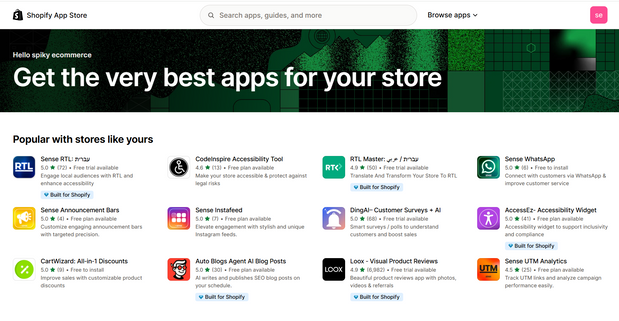
Shopify App Store Shopify covers the basics of any store, and everything beyond - there's a huge app ecosystem that allows you to adapt, accelerate growth, and maintain flexibility without compromising performance. Reading time: ~6 minutes TL;DR: Over 8,000 apps, a rigorous review process, a recommendation algorithm based on similar stores, and the ability to adapt to almost any need. The goal is to build a lean set of apps that brings measurable value, without duplication and without slowdowns. What are the apps for anyway? Speed ​​of implementation: advanced features without development from scratch. Flexibility: Change, test, and A/B before making a long-term decision. Scale: Most applications were built to meet the loads of large stores. Cost-effective: Add functionality as needed, paying only for what you use. How to choose the right one? A short checklist Clear goal: What is the metric we want to improve, conversions, AOV, uptime. Performance impact: How many scripts are loaded, is there support for App Blocks and Checkout Extensibility. Compatibility: format, language, currency, with existing applications. Pricing: Monthly model, pay-as-you-go fees, trial period. Support and documentation: guides, chat, update rate, ratings and reviews. Security and privacy: what permissions are required, backing up and exporting data. What's special about the Shopify App Store? Huge variety: more than 8,000 apps for every need, design, marketing, operations, checkout, shipping. Rigorous testing: Each app undergoes a review with over a hundred check points before publishing. Smart Recommendations: Performance-based suggestions from similar stores, less guesswork and more accuracy. Main categories in brief Categories: Sales Channels, Product Discovery, Product Selling, Orders & Shipping, Store Design, Marketing & Conversion, Store Management Top categories: Dropshipping, Marketplaces, Product Reviews, Upsells and Bundles, Email Marketing, SEO, Shipping, Currency, and Translation. Recommended apps by stage and need Starter set for a new store Product Reviews: Automatically collect and update reviews with images. Email marketing: pop-ups, cart abandonment series, regular mailings. Upsells and bundles: Complete offers on the product page and checkout. Basic SEO: meta, URL optimization, schemas. Translation and currency: localization for target countries. Growth set for an active store Loyalty and referrals: points, benefits, affiliate program. Advanced search and filters: Improved product detection, Smart Sort. Smart shipping and pricing: dynamic rates, packages, store pickup. Analytics and pixel implementation: centralized pixel management, conversion events. B2B set Pricing by customer, price lists: wholesale accounts, minimum order. Quick quotes and ordering: ordering tables, CSV files. Customized payment and shipping terms: Net Plus, credit, multi-address shipping. Recommended workflow for implementation Needs mapping: a list of goals and metrics, without rushing to install. Initial screening: 2-3 candidate apps for each need, tested against the template and existing set. Measurable pilot: -Installation in a test environment or calm time window, running logs and conversion metrics. Security hardening: reducing permissions, checking data exports and backups. Performance hardening: Lighthouse testing before and after, load time monitoring. Unification of the application set: removal of duplicates, conflict checking, full documentation. Common mistakes to avoid Over-installation: Too many apps without measurement, slowdowns and conflicts. Incompatibility: Mixing applications that inject old code into modern sections. Lack of documentation: There is no Owner for each application, no description of what it does. Privacy disregard: Broad permissions, no deletion or export policy. Frequently Asked Questions How do I know if an app matches my template? Look for support for App Blocks and Online Store 2.0, check for installation guides for common templates, and try a live demo. If you have a test environment, it's best to check there first. You can switch between apps without losing data. Check for export capabilities, e.g. CSV reviews, leads, subscription lists. If no export, consider a mediation tool or API import. How to make sure performance is not compromised Check ZRT, network requests, package size, and number of scripts. Prefer apps with App Blocks and server-side implementations where possible. Resources for further study Shopify Help Center: Official installation and operation guides. API documentation: For developers who want dedicated customizations. Shopify Community: Answers from the field, tips, community events. Shopify Blog, Research: Trends, Customer Stories, A/B Testing.
Read article
סקירת Shopify -השוק הישראלי Article tag: מכירות
  • Article author: By מורן זיו
  • Article published at:
Shopify Review - Israeli Market
A focused guide to the Israeli market, payments, shipping, VAT, localization, and apps that save time and money. Reading time: ~6 minutes TL;DR: For most businesses in Israel, Shopify is a great value: the strengths are quick setup, scale, a huge app ecosystem, connection to sales channels, and simple operation. The challenges are costs that can grow with apps, advanced content management, and local payment considerations. With the right choices in the app set and payment and shipping connections tailored to Israel, this is an excellent platform for growth. What is Shopify and how is it relevant to Israel? Shopify is a managed eCommerce platform that takes the headache out of servers, security, and updates. This allows you to focus on your product, marketing, and operations. This is significant for the Israeli market, because you can go live quickly with a store in Hebrew, RTL, and in shekel currency. Quick setup: A basic store can be up and running in just a few days. Hebrew and RTL: Right-to-left orientation support, including Hebrew phonetics. Currency: ILS, with local display of prices and tax display. Payments in Israel, what is important to know In Israel, we work with local clearing providers and digital wallet solutions alongside PayPal and credit cards. Common clearinghouses: PayPlus, CardCom, Tranzila, Pelecard, Meshulam. Wallets and Express: PayPal, Apple Pay, and Google Pay as supported by the carrier and browser. Tax invoices: Integrations to services such as iCount, Green Invoice, Priority, SAP Business One using connectors. 18% VAT: Correct presentation of prices with or without VAT according to the target audience, and compliance with local tax requirements. Tip!: Set up payments with a minimum of clicks, verify policy pages in Hebrew, and receive confirmation of proper management of fees and returns. Shipping and distribution, Israeli players Connecting to local logistics saves money and time for the Israeli customer who expects fast delivery. Common shipping companies: HFD, Israel Post, Boxit Lockers, Gett Delivery for urban deliveries, UPS and DHL abroad. Delivery options: pickup from the store, delivery to your home, locker close to home. Show delivery times: Transparency about time windows and delivery estimates reduces abandonment. Apps for Israel: Recommended Starter Set Shopify covers the bases. Everyone else has apps. Keep it lean and measured. Payment and Settlement: Integration with your chosen settlement provider, check App Blocks and up-to-date documentation. Tax invoices and receipts: connection to iCount or Green Invoice, or integration to an Israeli ERP. Shipping: Integrations to HFD, Boxit, or an aggregator solution that manages labels and tracking. Marketing and conversion: email marketing, product reviews, giveaways and bundles. SEO and content: tools for schema, meta, and redirects, especially for bilingual sites. Rule of thumb: New store - 5 to 6 apps. Active store around 10. Complex store 15 or more. Don't install without measuring! Scale, Omnichannel and Multichannel for Israel Scale: SaaS-based, fast and stable in campaigns and loads. Shopify POS: Suitable for retailers with physical stores and online sales, check hardware availability and payment support in Israel. Channels: Selling on the website, Facebook and Instagram, connecting to relevant marketplaces, with inventory synchronization and orders in one place. Disadvantages and considerations for Israel Advanced content management: Complex, multilingual blogs sometimes require CMS applications or a headless approach. App dependency: Too many apps slow you down. Choose only what proves valuable, and forgo everything else. Costs: Paid templates, apps, clearing fees, currency conversions, and shipping. Build a realistic annual budget in shekels. Platform lock-in: Future migration to another platform can be complex. Document processes and data from day one. Who is Shopify suitable for in Israel? SMB: Businesses that are willing to invest in design, operations, and marketing to grow measurably. B2C and D2C: Brands that sell directly, with the need for local payments and fast shipping. B2B: Pricing by customer, minimum order, price quotes, and special payment terms through apps and customized checkout processes. Who is it less suitable for: Those who are starting without a budget at all, or those who need very heavy development in the first stage. Frequently Asked Questions for Israel Is it possible to sell only in shekels and display prices in other currencies? Yes. The final price is charged in ILS, and additional currencies can be displayed for global customers for convenience. How do you handle 18 percent VAT? Determine whether the price to the consumer includes or excludes VAT according to the type of customer, define correct tax calculation, and set up a legal tax invoicing system. Which shipping is the most profitable in Israel? It depends on your volume, goals, and SLA. Usually, a combination of lockers/pickup points and home delivery provides good coverage and a reasonable cost. Summary Shopify remains a strong solution for the Israeli market. If you set up a local payments and shipping infrastructure, build a lean and scalable set of apps, and manage data properly, the project will move quickly and grow healthily. For those looking for scale, omnichannel, and clean operations, this is an excellent choice.
Read article
חנות אינטרנטית מחיר: כמה באמת עולה להקים חנות אונליין? Article tag: אינטגרציות
  • Article author: By SPIKY TEAM
  • Article published at:
Online store price: How much does it really cost to set up an online store?
Online store price, how much does it really cost to set up an online store? We break down the costs, from the platform to CRO, so you can go live without surprises. Reading time: ~5 minutes TL;DR: Cost depends on scale and needs. You can start basic with relatively low costs, or invest in custom design and development to maximize conversions in the long run. It's important to plan ahead for platform, plugins, checkout, shipping, and CRO. Why is everyone asking now how much does an online store cost? More businesses are moving to online sales and are asking the obvious question, how much does it cost to set up an online store? Here we will help you target your budget and avoid surprises. What affects the final price? Commerce platform: Shopify, WooCommerce or another solution. Design and development: ready-made template or custom design. Plugins and integrations: payments, shipping, marketing. CRO: Improvements that actually increase conversions. Hosting and domain: ongoing costs. Marketing and promotion: SEO, campaigns, content. Sample cost ranges Basic store Shopify Basic, $29/month Ready-made template, $100 to $200 one-time Basic setup, 5,000 to 10,000 NIS Custom shop Design and development, respectively, 15,000 to 60,000 NIS Special integrations, 2,000 to 10,000 NIS as needed CRO to increase sales, 5,000 to 20,000 NIS CRO, how to turn more visitors into customers An online store is a shopping experience. Many stores convert only 1 to 3 percent of their visitors. To improve: Short buying process: fewer steps to payment, fewer abandonments. User reviews: Trust that translates into purchases. Photos and descriptions: high-quality, clear and convincing. Tempting offers: coupons, promotions, and bundles that increase your basket. Mobile is great: Most purchases happen on a smartphone. Summary The cost depends on the scope of the project and goals. You can start with a basic store for a few thousand, or you can invest in customized design and development that will generate more sales over time. Proper planning and budget allocation between platform, user experience, and CRO will help you reach your goals faster. Want your online store to sell more? At Spiky, we will tailor a setup or upgrade to your exact needs and budget. Talk to us Tags Budget CRO Shopify Online Store
Read article
כמה עולה להקים חנות אינטרנטית? המדריך המלא לתמחור חנות אונליין Article tag: CRO
  • Article author: By Nissan Mizrahi
  • Article published at:
How much does it cost to set up an online store? The complete guide to online store pricing
How much does it cost to set up an online store, the complete guide to pricing an online store Everything that affects the price, from the platform and design to integrations, SEO and CRO, to choose a path that suits your business and budget. Reading time: ~3 minutes TL;DR: A basic store ranges from 5,000 to 10,000 NIS, customization 15,000 to 30,000 NIS, and complex developments starting at 30,000 NIS. Monthly costs, platform, plugins, and marketing should also be considered. Choose a stable platform, a good template, a lean app set, and CRO measurement. Why is this question important? More business owners are getting into e-commerce and asking how much it costs to set up an online store. The answer depends on the platform, design, development, user experience, plugins, and integrations. Here we break down the costs and provide guidelines for making a smart choice. Factors that affect the price Commerce platform: Shopify, WooCommerce, Wix, each has advantages and disadvantages. Design and development: ready-made template vs. custom design. Functionality and integrations: clearing, inventory management, shipping, CRM, mailing, analytics. SEO and digital marketing: campaigns, content, technical optimization and keywords. CRO and user experience: shortening the buying process, social proof, mobile, converting product pages. What does a basic package include? Building a store with a responsive design optimized for mobile. Connection to a clearing system. Product and category management. Coupons and discounts. Basic SEO settings for Google. Add-ons that increase conversions and customer lifetime value Advanced SEO: keyword research, content, optimization for terms such as building a virtual store, setting up a sales website, online store pricing. Connections to third-party systems: CRM, mailing, advanced analytics. Automations: cart abandonment flows, review collection, personalization. Price comparison, how much does it actually cost? Basic store: 5,000 to 10,000 NIS. Custom store: 15,000 to 30,000 NIS. Store with complex developments and advanced integrations: 30,000 NIS and up. Remember to include ongoing costs , platform, plugins, domain and storage, marketing tools, and campaigns. How to choose the right route Mapping needs and goals: catalog, channels, automations, audience. A lean set of plugins: Install only what proves valuable and measure performance. Focus on CRO: form shortening, checkout trust, reviews, complementary offers. Annual budget planning: Build a model of establishment plus maintenance and marketing. Want an accurate quote for a store that suits your business? Spiky's experts will help you choose a platform, build a converting store, and configure an effective set of plugins. Talk to us
Read article
שיפור תהליכי העבודה עם Shopify Flow - כל מה שחדש Article tag: CRO
  • Article author: By Nissan mizrahi
  • Article published at:
Improving Workflows with Shopify Flow - Everything New
Shopify Flow, two powerful time-saving Debug updates Detailed data tracking and quick search of fields and values. It's easier to detect errors, measure results, and improve automation. Category: Automation Shopify Flow Reading time: ~4 minutes TL;DR: Starting in mid-January 2025, Flow stores input and output for every trigger and action and allows searching for values ​​and fields throughout the process. No need to add a log at each step. Saves hours of debugging and quickly sees where and why the flow broke. 1) Detailed tracking of process data Now we see the input and output at each node of the flow. Triggers: Input shows the ID that triggered the flow, Output shows the fields pulled from the object, for example order items. Actions: Input shows the instructions defined, Output shows the actual result including fields returned from the API. Available for flows running from mid-January 2025 onwards. 2) Quick search in fields and values A single search bar that scans values ​​and field names throughout the flow, without opening each step individually. Check if a tag has been added to a product or order in real time. Find where the mapping of an external field fell. Although the text indicates a search in the trigger, in practice the coverage is broader. Why is this important? Before the upgrades, we would add Log actions at each step and search manually. Now we see the data in one place, identify empty fields, unexpected values, and API errors quickly, and shorten the time to fix. Quick implementation checklist Diagnosing existing flows Open recent runs and check input and output at each step. Locate fields that return blank or unexpected values. Upgrading rules Add a condition that prevents sending when a key field is missing. We updated mapping to new field names in integrations. Speed ​​tests Use search to make sure tags and statuses are added. Run a test on a sample order and check API output. Practical usage examples Clearing and shipping: If shipping integration did not receive a phone call, check the output to see if the field was pulled from the trigger or dropped in the mapping. Automatic tags: Search for the tag name to make sure it was added at the right time and to the right entity. ERP synchronization: built a filter that stopped when a mandatory SKU field was missing, protecting the integration from errors. Best Practices for Reducing Debug Time Clear names for steps: Action that explains what it does and what it returns. Validation checks: Conditions that verify required fields before API calls. Versions: Save a copy of a working flow before making a significant change. Collect samples: Keep sample orders of any type of scenario for quick testing. Want us to review and optimize the flows in Shopify Flow? At Spiky, we map failures, implement smart tests and automations, and shorten your debugging time. Talk to us
Read article