Shopify Magic: The Future of Store Management – Here and Now
Artificial intelligence is no longer just for big companies. Today, every store owner can enjoy the power of AI directly from within the Shopify environment. Meet Shopify Magic and Sidekick - the smart combination that lets you do more, in less time, and with surprising ease.
What exactly is Shopify Magic?
Shopify Magic is an umbrella name for artificial intelligence-based tools embedded in the core of the Shopify platform. Instead of jumping between different systems, the content, analysis, and automation happen right where you work. It's not a plugin - it's part of the system. And the magic? It all happens in seconds.
Sidekick – Your New Personal Assistant
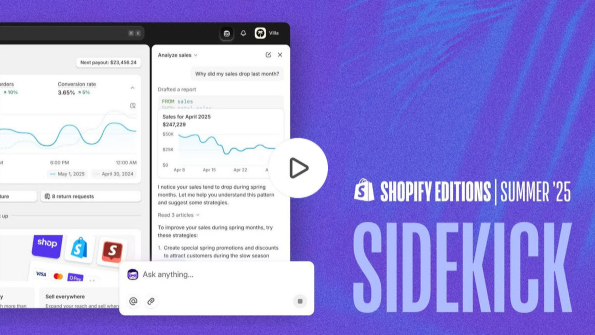
Imagine having a Shopify expert available 24/7. This is Sidekick - the smart assistant that understands your data, analyzes performance, suggests business ideas, and writes content tailored to your brand style. It's not just reactive - it's proactive. Sidekick identifies opportunities, streamlines processes, and provides real insights on how to improve sales and store efficiency.
Simple management. Accurate results.
Shopify Magic and Sidekick can handle everyday tasks like:
Create product descriptions that sell.
Editing product images – including removing backgrounds or creating new scenes with one click.
Analysis of sales reports and recommendations for performance improvement.
Creating email campaigns that produce real results.
All of this from within the Shopify administration interface - without the need to run additional systems.
Turn conversations into opportunities
Shopify Magic also knows how to help with the human side of business - customer service. It formulates personal and empathetic responses, maintains the brand tone, and allows customers to be answered quickly and accurately. The result? Less time on wording, more sales.
The future is already here.
Whether you're a small business starting out or a large brand managing thousands of variants, Shopify Magic allows you to work smarter, grow faster, and focus most of all - on your customers.
You are invited to watch the Shopify demo.
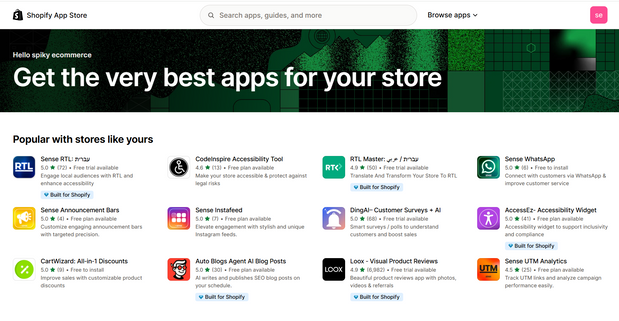
Shopify App Store
Shopify covers the basics of any store, and everything beyond - there's a huge app ecosystem that allows you to adapt, accelerate growth, and maintain flexibility without compromising performance.
Reading time: ~6 minutes
TL;DR: Over 8,000 apps, a rigorous review process, a recommendation algorithm based on similar stores, and the ability to adapt to almost any need. The goal is to build a lean set of apps that brings measurable value, without duplication and without slowdowns.
What are the apps for anyway?
Speed of implementation: advanced features without development from scratch.
Flexibility: Change, test, and A/B before making a long-term decision.
Scale: Most applications were built to meet the loads of large stores.
Cost-effective: Add functionality as needed, paying only for what you use.
How to choose the right one? A short checklist
Clear goal: What is the metric we want to improve, conversions, AOV, uptime.
Performance impact: How many scripts are loaded, is there support for App Blocks and Checkout Extensibility.
Compatibility: format, language, currency, with existing applications.
Pricing: Monthly model, pay-as-you-go fees, trial period.
Support and documentation: guides, chat, update rate, ratings and reviews.
Security and privacy: what permissions are required, backing up and exporting data.
What's special about the Shopify App Store?
Huge variety: more than 8,000 apps for every need, design, marketing, operations, checkout, shipping.
Rigorous testing: Each app undergoes a review with over a hundred check points before publishing.
Smart Recommendations: Performance-based suggestions from similar stores, less guesswork and more accuracy.
Main categories in brief
Categories: Sales Channels, Product Discovery, Product Selling, Orders & Shipping, Store Design, Marketing & Conversion, Store Management Top categories: Dropshipping, Marketplaces, Product Reviews, Upsells and Bundles, Email Marketing, SEO, Shipping, Currency, and Translation.
Recommended apps by stage and need
Starter set for a new store
Product Reviews: Automatically collect and update reviews with images.
Email marketing: pop-ups, cart abandonment series, regular mailings.
Upsells and bundles: Complete offers on the product page and checkout.
Basic SEO: meta, URL optimization, schemas.
Translation and currency: localization for target countries.
Growth set for an active store
Loyalty and referrals: points, benefits, affiliate program.
Advanced search and filters: Improved product detection, Smart Sort.
Smart shipping and pricing: dynamic rates, packages, store pickup.
Analytics and pixel implementation: centralized pixel management, conversion events.
B2B set
Pricing by customer, price lists: wholesale accounts, minimum order.
Quick quotes and ordering: ordering tables, CSV files.
Customized payment and shipping terms: Net Plus, credit, multi-address shipping.
Recommended workflow for implementation
Needs mapping: a list of goals and metrics, without rushing to install.
Initial screening: 2-3 candidate apps for each need, tested against the template and existing set.
Measurable pilot: -Installation in a test environment or calm time window, running logs and conversion metrics.
Security hardening: reducing permissions, checking data exports and backups.
Performance hardening: Lighthouse testing before and after, load time monitoring.
Unification of the application set: removal of duplicates, conflict checking, full documentation.
Common mistakes to avoid
Over-installation: Too many apps without measurement, slowdowns and conflicts.
Incompatibility: Mixing applications that inject old code into modern sections.
Lack of documentation: There is no Owner for each application, no description of what it does.
Privacy disregard: Broad permissions, no deletion or export policy.
Frequently Asked Questions
How do I know if an app matches my template?
Look for support for App Blocks and Online Store 2.0, check for installation guides for common templates, and try a live demo. If you have a test environment, it's best to check there first.
You can switch between apps without losing data.
Check for export capabilities, e.g. CSV reviews, leads, subscription lists. If no export, consider a mediation tool or API import.
How to make sure performance is not compromised
Check ZRT, network requests, package size, and number of scripts. Prefer apps with App Blocks and server-side implementations where possible.
Resources for further study
Shopify Help Center: Official installation and operation guides.
API documentation: For developers who want dedicated customizations.
Shopify Community: Answers from the field, tips, community events.
Shopify Blog, Research: Trends, Customer Stories, A/B Testing.
Challenges in Shopify Plus, what's important to know before upgrading
Shopify Plus provides power and growth, but requires technical and operational preparation. This way you know what to expect and how to overcome obstacles.
Reading time: ~6 minutes
TL;DR: Plus adds Checkout Extensibility, Functions, and B2B capabilities, but still has limitations in dynamic pricing, ERP integrations, variants, and support. Build a hybrid solution, Functions for rules, Apps where it saves time, Flow for automation, and a technical partner who knows the nuances.
1) Flexibility on the payment page
More advanced customizations are possible than standard programs, but customized fields and deep integrations require Extensions or Functions.
Solution: Use Shopify Functions to define rules, Checkout UI Extensions for components, and dedicated apps where needed.
2) Discounts and dynamic pricing
There are Scripts and Functions, but full differential pricing by user or group is not fully built in.
Solution: Discount rules in Functions, price tables through Apps, and B2B policies by customer groups.
3) Integration with ERP and CRM
Deep joins often require intermediaries or dedicated development, especially in field mapping and error control.
Solution: Custom API, Integrator.io or Celigo for varitory scheduling, and Flow for pre-send validations.
4) B2B budget and order management
Shopify B2B is powerful, but there is no built-in mechanism for monthly or quarterly budgets.
Solution: Metafields for per-customer budget, Flows for basket limitation and approval, and customized budget reports.
5) Variants and inventory
Complex variant management or advanced kitting will often require third-party applications.
Solution: Matrixify for massive catalog management, apps for extended variants, and display rules with Functions.
6) Technical support
Dedicated support is available, but for integration or architecture issues you will sometimes need an expert partner.
Solution: Working with a Plus Partner agency, defining an internal SLA, and fully documenting integrations.
Table of challenges and solutions
challenge
How to solve
Owner
Custom fields at checkout
Checkout UI Extensions, validations with Functions
Frontend
Pricing by groups
Apps for differential pricing, general functions for discounts
Commerce
Two-way ERP
Integrator.io, Field Mapping, Retry, and Scheduling Windows
Integrations
B2B budget management
Metafields, Order Blocking Flow, Multi-Layer Approval
Oops
Complex variants
Matrixify, Bundling Apps, Smart Display Rules
Catalog
Support for complex questions
Plus Partner, internal playbooks and documentation
PM
Best Practices for Upgrading a Part
Proof of Concept: Build a test environment with POS, B2B, and pricing flows before a full transition.
Organized catalog: uniform option names, handling problematic variations in advance.
Integrations in stages: start with one-way reads, add writes only after monitoring.
Measurement: Set KPIs, CVR at checkout, AOV, load time, number of integration failures.
Fallback: Playbook for rollback, and customer service ready for exceptions in the first week.
Considering upgrading to Shopify Plus
At SPIKY DIGITAL, we will build the right architecture, implement functions and extensions, connect ERP and CRM, and measure results.
Talk to us
Shopify Flow, two powerful time-saving Debug updates
Detailed data tracking and quick search of fields and values. It's easier to detect errors, measure results, and improve automation.
Category: Automation Shopify Flow
Reading time: ~4 minutes
TL;DR: Starting in mid-January 2025, Flow stores input and output for every trigger and action and allows searching for values and fields throughout the process. No need to add a log at each step. Saves hours of debugging and quickly sees where and why the flow broke.
1) Detailed tracking of process data
Now we see the input and output at each node of the flow.
Triggers: Input shows the ID that triggered the flow, Output shows the fields pulled from the object, for example order items.
Actions: Input shows the instructions defined, Output shows the actual result including fields returned from the API.
Available for flows running from mid-January 2025 onwards.
2) Quick search in fields and values
A single search bar that scans values and field names throughout the flow, without opening each step individually.
Check if a tag has been added to a product or order in real time.
Find where the mapping of an external field fell.
Although the text indicates a search in the trigger, in practice the coverage is broader.
Why is this important?
Before the upgrades, we would add Log actions at each step and search manually. Now we see the data in one place, identify empty fields, unexpected values, and API errors quickly, and shorten the time to fix.
Quick implementation checklist
Diagnosing existing flows
Open recent runs and check input and output at each step.
Locate fields that return blank or unexpected values.
Upgrading rules
Add a condition that prevents sending when a key field is missing.
We updated mapping to new field names in integrations.
Speed tests
Use search to make sure tags and statuses are added.
Run a test on a sample order and check API output.
Practical usage examples
Clearing and shipping: If shipping integration did not receive a phone call, check the output to see if the field was pulled from the trigger or dropped in the mapping.
Automatic tags: Search for the tag name to make sure it was added at the right time and to the right entity.
ERP synchronization: built a filter that stopped when a mandatory SKU field was missing, protecting the integration from errors.
Best Practices for Reducing Debug Time
Clear names for steps: Action that explains what it does and what it returns.
Validation checks: Conditions that verify required fields before API calls.
Versions: Save a copy of a working flow before making a significant change.
Collect samples: Keep sample orders of any type of scenario for quick testing.
Want us to review and optimize the flows in Shopify Flow?
At Spiky, we map failures, implement smart tests and automations, and shorten your debugging time.
Talk to us
12 Email Automations Every Ecommerce Store Must Have
Email automations that increase sales, strengthen loyalty, and reduce churn. A quick guide to quick and safe implementation.
Reading time: ~6 minutes
TL;DR: Implement three mandatory layers first, Welcome, Abandoned Cart, Post Purchase. Add a loyalty layer, reactivation, and personalized offers. Measure Open, Click, CVR, Email Revenue, and take care of sending reputation.
The 12 Important Automations
Welcome: A warm welcome message with value, brand story, and sign-on benefit.
Abandoned Cart: A chain of 2 to 3 messages with product images and a shortcut to the cart.
Order confirmation: full details, delivery times, tracking link.
Shipping update: departure status, expected delivery, tracking link.
Thank you for your purchase: trust boost, code for next purchase, review request.
Reactivation for dormant customers: A unique offer for returning to purchase.
Upsale and cross-sale: complementary items based on a previous purchase.
Review Request: After initial use, a quick link to leave a review.
Joining a customer club: exclusive benefits, points, priority for promotions.
Updates and promotions: Periodic newsletter with new products and events.
Birthdays: Greetings with a customized coupon.
Recommendations based on previous purchases: Personalization based on history and behavior on the site.
Best Practices for Smart Configuration
Timings
Abandoned cart, 1 to 2 hours, 24 hours, 72 hours.
Review request, 7 to 10 days from delivery.
Reactivation, 45 to 60 days without purchase.
content
A short and clear title, one main value.
Sharp product images, prominent CTA.
Social proof, quotes and reviews.
Personalization
First name, favorite categories.
Recommendations based on viewing and purchase.
Coupon adjusted for historical AOV.
Deliverability
Verified domain, SPF, DKIM, DMARC.
List hygiene, regular cleaning of inactive recipients.
Stepwise warm-up rate for new lists.
Metrics that must be measured
Open Rate
Positive trend after A/B testing of Row and Sender.
Click Rate
Is the CTA clear and relevant?
CVR
Email-to-purchase conversion rate.
Revenue per Email
Average revenue per email sent.
Unsub and Spam
Less than 0.1 percent of complaints is preferable, otherwise refine frequency and content.
Quick Start Checklist
Map the customer funnel and define clear triggers.
Write 2 versions of each email for A/B testing.
Segments are created by loyalty, frequency, and category.
Set sending limits to avoid being overwhelmed.
Check on mobile before publishing.
Want us to build email automations for you that generate regular income?
In Spiky, we will define the 12 flows, write creative, and schedule A/B tests with a measurement dashboard.
Talk to us